
A garage opener usually picks the worst possible time to stop cooperating - when you're late for work, stuck outside in the cold, or trying to get the door closed before bed. If you're searching for how to reset garage opener systems, the good news is that many reset issues are simple. The tricky part is knowing whether you need to reprogram the opener, reconnect the trolley, reset the remote, or deal with a larger mechanical problem.
That distinction matters. A true reset can solve keypad and remote problems fast. It will not fix a broken spring, stripped gear, door imbalance, or an opener that's failing under load. If the motor hums, the door jerks, or the door feels unusually heavy by hand, stop there. That's no longer a programming issue.
When a garage opener reset makes sense
Most homeowners use the word reset to mean one of three things. They want to erase old remote controls, reconnect the opener after the emergency release was pulled, or restore the opener after a power issue. Those are all common, and each one has a slightly different fix.
A reset is worth trying if your wall button works but your remotes do not, if your keypad suddenly stopped opening the door, or if the opener lights are on but the system is acting like it forgot its accessories. It also makes sense after moving into a home, because old remotes may still be programmed.
If nothing has power, start simpler. Check the breaker, the outlet, and any GFCI outlet nearby before you start pressing programming buttons.
How to reset garage opener controls
The exact steps depend on the opener brand, but the basic process is similar for LiftMaster, Chamberlain, Genie, Craftsman, and many other units.
Step 1: Find the Learn or Program button
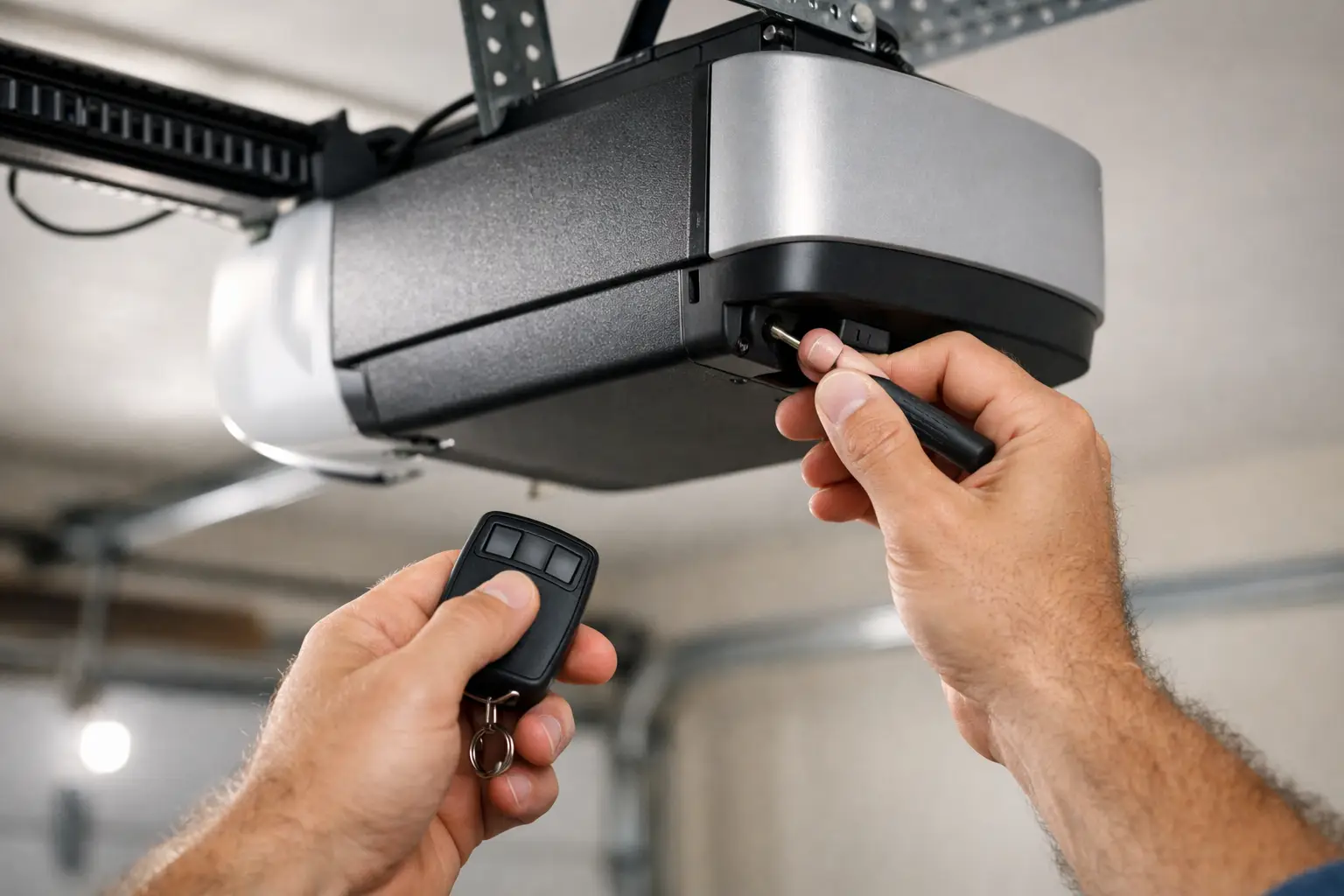
Stand on a ladder and look at the motor unit hanging from the ceiling. On most openers, the Learn or Program button is under the light cover or on the back panel. It may be yellow, purple, red, orange, or green depending on brand and model.
That button is the key to most reset functions. A quick press usually puts the opener into programming mode. Holding it longer often erases stored remotes and keypads.
Step 2: Decide whether you want to erase everything
This is where people accidentally create more work for themselves. If only one remote stopped working, you may not need a full wipe. You may only need to reprogram that device.
If you bought the home recently, lost a remote, or want to remove old access devices for security, then a full erase is the better move. On many units, holding the Learn button for around 6 to 10 seconds clears all paired remotes and keypads. The indicator light usually turns off or changes behavior to confirm the memory was erased.
Once that's done, every remote and keypad you still use will need to be programmed again.
Step 3: Reprogram the remote
Press and release the Learn button. You usually have about 30 seconds to press the button on your remote. When the opener light blinks or you hear a click, that remote has been accepted.
Test it before climbing down for good. If it works only from very close range, the battery in the remote may be weak, or the opener's antenna may be damaged or tucked up too high.
Step 4: Reprogram the keypad
For wireless keypads, press the Learn button on the opener, then enter your desired PIN on the keypad and press Enter. Some brands use slightly different timing, but that is the standard pattern.
If the keypad lights up but will not pair, try replacing the battery first. A weak keypad battery causes a lot of false reset attempts.
How to reset garage opener after pulling the red cord
This is another common situation. Someone pulls the red emergency release cord during a power outage or while troubleshooting, and later the opener runs but the door does not move. In that case, the opener may not need a programming reset at all. It may just need to reconnect to the door trolley.
With the garage door fully closed, pull the emergency release cord toward the opener so the latch is ready to re-engage. Then press the wall button or remote. In many systems, the trolley reconnects automatically when it moves along the rail.
If it doesn't catch right away, move the door manually a little until the latch lines up. Keep your hands clear of pinch points, and don't force the door if it feels heavy. A heavy door often points to a spring problem, not an opener problem.
Resetting after a power outage or surge
Power glitches can confuse opener electronics, especially on older units. If your opener is unresponsive after power returns, unplug it for about 30 to 60 seconds, then plug it back in. This acts as a basic power reset.
If the opener powers up but the travel seems off, the limits may need adjustment. That's not always the same as a reset. Travel limits tell the opener where to stop when the door is fully open and fully closed. If those settings drift, the door may reverse early, stop short, or push too hard into the floor.
Some newer openers let you reset and relearn travel electronically. Others use manual adjustment screws. If you change limit settings without understanding what the door is doing, you can make the problem worse. A door that reverses can also be reacting to binding rollers, bent track, or bad safety sensors.
When the safety sensors are the real issue
A lot of people assume the opener needs resetting when the actual problem is the photo-eye sensors near the bottom of the track. If those sensors are blocked, bumped out of alignment, or have loose wiring, the opener may refuse to close the door.
Check that both sensor lights are on and steady. Wipe the lenses clean. Make sure nothing is stored in the beam path. If one light is off or flickering, gently adjust the sensor until both lights stay solid.
This is especially common in garages with kids, bikes, storage bins, or winter clutter. A reset won't override a sensor fault on a properly working system, and that's a good thing.
Signs a reset will not fix the problem
Here's the part homeowners appreciate hearing straight. Sometimes the opener is not the failure point at all.
If the door goes up a few inches and stops, if the opener strains loudly, or if the top section shakes hard during movement, stop using it. Those symptoms often mean a broken spring, failing rollers, a damaged cable, or a door that is off balance. Resetting the opener in that situation may get the motor to try again, but it won't remove the load that's causing the problem.
The same goes for openers that click but do not run, smell hot, or work intermittently. That could be a bad capacitor, worn gear set, logic board issue, or motor problem. Some repairs are straightforward. Some mean it's more cost-effective to replace the opener, especially if the unit is older and parts are no longer easy to source.
How to reset garage opener systems without creating a bigger repair
A careful approach saves time. Start with power, then remotes, then sensors, then trolley connection. Only after that should you look at travel settings or force adjustments.
Avoid cranking force settings higher just to make the door move. That's one of the fastest ways to mask a door problem and burn up the opener. The opener should guide a properly balanced door, not drag a failing one open.
If you recently moved into a home, a full memory erase followed by reprogramming your current remotes is smart for security. If you're troubleshooting one dead remote, change its battery before wiping the whole system. And if the emergency release was pulled, think reconnection before reprogramming.
For homeowners in Greeley and nearby areas, we see this all the time - a customer thinks the opener forgot its settings, but the real issue is a worn spring or a door that's gotten too heavy for the motor. That's why a reset is best treated as a first check, not the only check.
A few brand differences to keep in mind
Most opener brands follow the same reset logic, but the details vary. LiftMaster and Chamberlain units often use a colored Learn button. Genie may use Program and Set buttons instead. Craftsman openers may mirror Chamberlain instructions depending on age and manufacturer.
If you have a newer smart opener, app settings and Wi-Fi connection are separate from basic door operation. Resetting the opener memory may not fix app pairing, and resetting the Wi-Fi may not restore remote control programming. Those are related systems, but not always the same system.
When in doubt, look at the label on the motor head before doing anything else. Model information saves guessing.
If your garage opener reset gets the door working again, great. Keep an eye on how the door moves over the next few days. Smooth, quiet travel is a good sign. Jerking, grinding, or slow starts usually mean there's still a mechanical issue waiting to show itself fully. A reset can restore access, but a properly working door should never have to fight its way open.